








OpenpassAI
Outreach Writer

Networking messages that get replies.

Pick the message you need: a LinkedIn connection note, cold outreach, a referral request, a follow-up, a thank-you or a coffee-chat request. Add the role, the company and who it’s for, choose a tone, and get a short message that mentions one or two skills you’ve actually proven, never made-up experience.

Included with Pro · Cancel anytime

Credentials worth mentioning, from the certifications you’re earning

  • CompTIA
  • AWS
  • Cisco
  • Microsoft
  • Google Cloud
  • ISC2
  • NVIDIA
  • Databricks
  • Red Hat
  • Splunk
  • Salesforce
  • Linux Professional Institute

The right message for every step of the search

Most jobs are found through people. These messages get you in front of them.

01

Six messages, one place

From the first connection request to the thank-you after the interview, every message type has its own length and purpose, so it reads the way that moment calls for.

  • Connection notes and cold outreach
  • Referral requests and follow-ups
  • Thank-you notes and coffee chats
02

Grounded in what you’ve proven

Messages draw on your certifications and the skills you’ve proven in assessments, and mention only one or two of them, specifically. Nothing is invented: no employers, titles or numbers you didn’t give it.

  • Your real certifications
  • Your proven skills
  • No made-up experience
03

Short enough to get read

A LinkedIn note stays under LinkedIn’s 300 characters; the rest run about 80 to 140 words. They sound like a person wrote them, without “I hope this message finds you well”.

  • Under 300 characters for LinkedIn
  • Warm, professional or concise
  • Personalized to the person

Write it in seconds

Tell it who, where and why

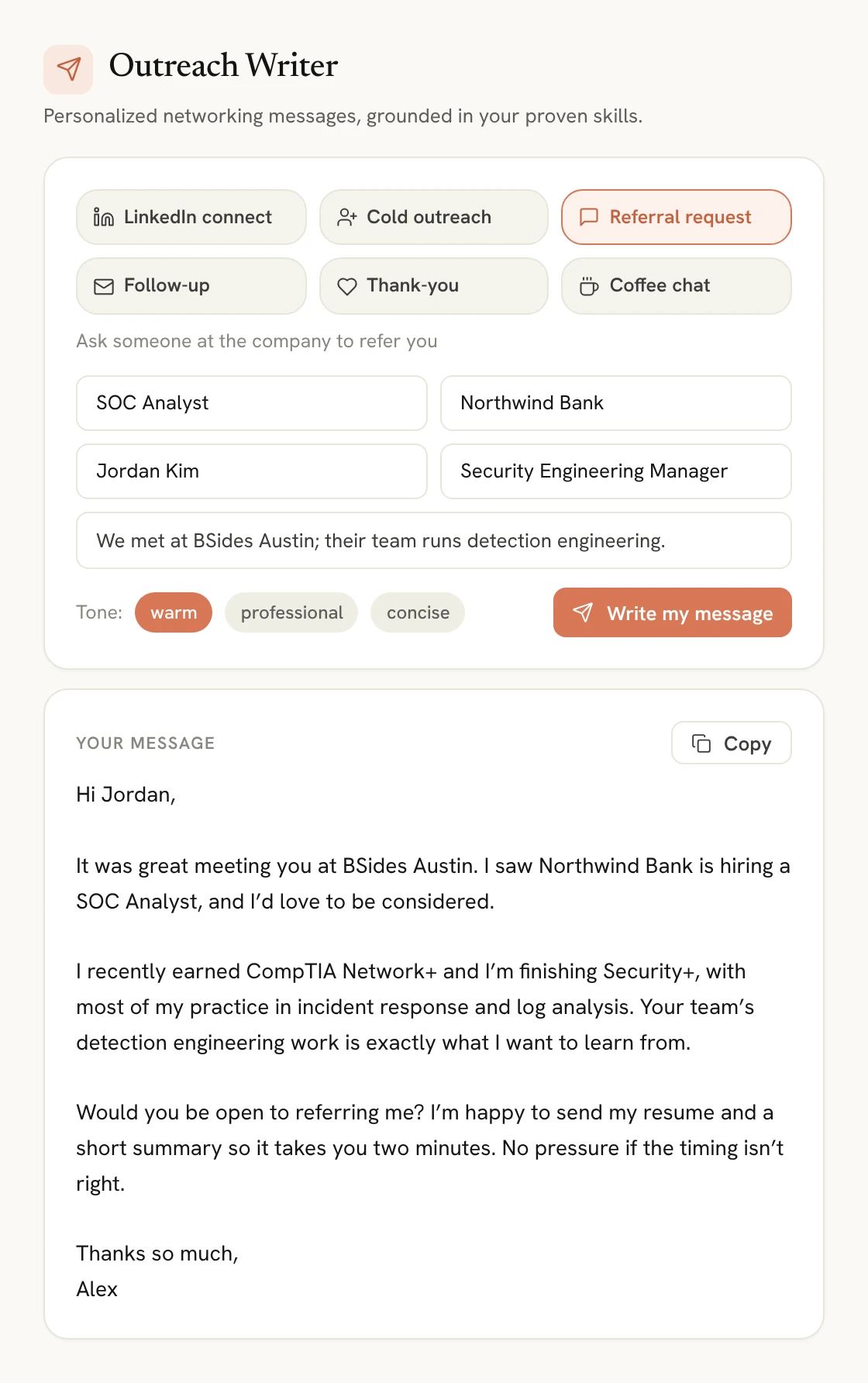
Choose the message type, add the target role and company, the person’s name and role if you know them, and anything worth mentioning, like a mutual connection or a project of theirs. Pick warm, professional or concise, and copy the result when it’s right.

The Outreach Writer set to Referral request for a SOC Analyst role, with the recipient, a warm tone and a short generated message ready to copy

Message types

Six messages for every stage

Each one has its own length, structure and ask.

LinkedIn connect

A short note to connect with a recruiter or hiring manager, under 300 characters.

Cold outreach

Introduce yourself and your interest in a role, ending with a low-pressure ask.

Referral request

Ask someone at the company to refer you, and make it easy to say yes.

Follow-up

Follow up on an application with one concrete reason to hire you.

Thank-you

A post-interview note that references the conversation and your fit.

Coffee chat

Ask for a 15-minute informational interview, respectfully.

Pricing

Achieve your career goals faster

Start for free. Upgrade anytime. No hidden fees.

Backed by our 100% Pass Guarantee

Compare everything in each plan

Free

$0/month

200 credits · No credit card required

Start Free
  • 200 starter credits
  • Sample practice exams & simulators
  • Explore audio lessons
  • Review with flashcards
  • Test selected hands-on labs

Pro

Unlimited

$19/month

Cancel anytime

Upgrade to Pro
  • All certification paths in one subscription
  • AI Tutor for instant guidance
  • Practice exams for real test readiness
  • Hands-on labs for practical skills
  • Interview skill builder for better answers
  • Resume optimization engine for a stronger profile

FAQs

Got Questions? We’ve Got Answers.

Find quick answers or contact our support team.

Which messages can it write?

LinkedIn connection notes, cold outreach messages, referral requests, follow-ups on applications, post-interview thank-you notes and coffee-chat requests.

Will it make things up about me?

No. It uses your certifications and the skills you’ve proven in assessments, plus whatever you tell it, and never invents employers, titles or numbers.

How long are the messages?

LinkedIn connection notes stay under 300 characters. Other messages are about 80 to 140 words, depending on the type.

Can I use it from the Application Tracker?

Yes. Each application has a button that opens the Outreach Writer with that role and company filled in.

Is the Outreach Writer free?

The Outreach Writer is included with Pro.

Keep exploring

More ways OpenpassAI gets you exam-ready

Career Tools

AI Interviewer

Sit the interview. Before the interview.

Explore AI Interviewer

Career Tools

AI Resume Optimizer

Turn your certification into a job offer.

Explore AI Resume Optimizer

Career Tools

Career Roadmap

Your path from certification to job offer.

Explore Career Roadmap

Ready to Get Certified Faster?

Start free today or see it in action first.

OpenpassAI

Hi 👋 I’m OpenpassAI. Ready to prepare for your exam the smarter way?

Ready to explore OpenpassAI? I can show you how the platform helps you prepare, practice, and pass.